Vocabulary flashcards

Learn the words you actually mean to learn.

Save a word, review it at the right moment, open it in a dictionary you pick.

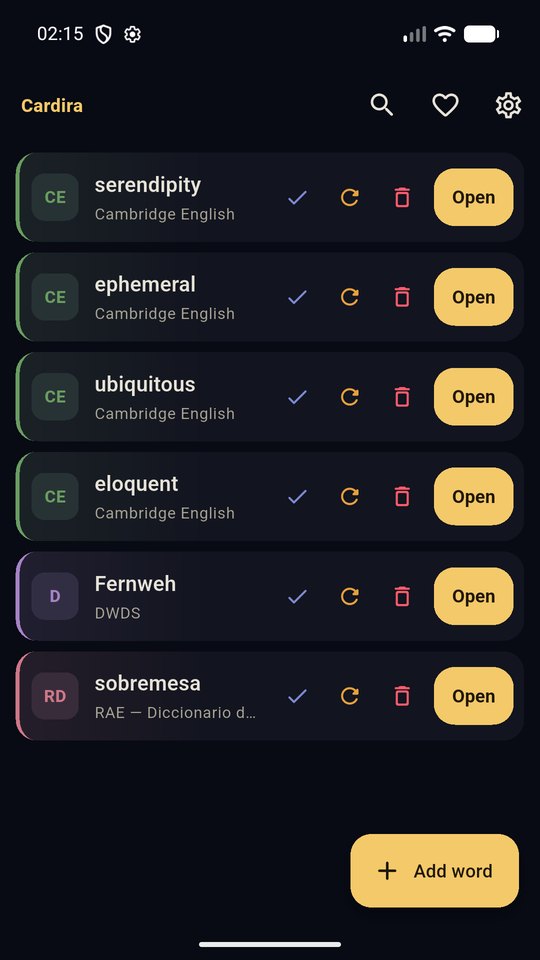
Add a word. Pick the dictionary you want to look it up in. Cardira brings that word back at the right moment — sooner if you forgot it, much later once you know it — and the big Open button takes you straight to its page in the dictionary you chose. That is the whole loop. No decks to build, no courses, no streak to protect.

Coming soon to Google Play What it does

Cardira is in pre-release testing. It is not on Google Play yet — this page will carry the link as soon as it is. An iOS release is planned after Android.

193dictionaries built in
64publishers
30+languages
0accounts, servers, trackers of ours

What it does

Four things, done properly, and nothing else competing for your attention.

You choose the dictionary

193 dictionaries from 64 publishers across more than 30 languages are built in, and every single link was checked against a live word page before it shipped. Monolingual and bilingual, English and well beyond it: French, German, Spanish, Italian, Portuguese, Turkish, Japanese, Korean, Chinese, Persian, Hebrew, Greek, Arabic, Russian, Hindi, Latin and more.

Yours missing? Paste any dictionary's web address with {word} where the word belongs, and Cardira will use it. Dictionaries you add work exactly like the built-in ones.

Spaced repetition that stays out of the way

Cardira uses a Leitner ladder. Remember a word and it moves up a box and comes back later; forget it and it comes straight back. Your list is simply your words, most overdue first.

Words you have fully learned move to a Learned list instead of cluttering the queue, and a daily cap on new words stops a big import flooding you.

Everything stays on your phone

No account. No sign-in. No server — we could not read your word list if we wanted to. Your words, your progress and your own dictionaries live on your device, and uninstalling deletes them.

Export a backup file whenever you like and import it on another phone. That export is also the only way to move your words between devices, so please do use it.

No permission prompts. No notifications.

Cardira never asks for location, contacts, photos, files, the camera or the microphone, and it never sends you a notification. Not "off by default" — not there at all.

On Android you can also share or select text in another app and send it to Cardira. It arrives ready to save, with the dictionary you used last already chosen.

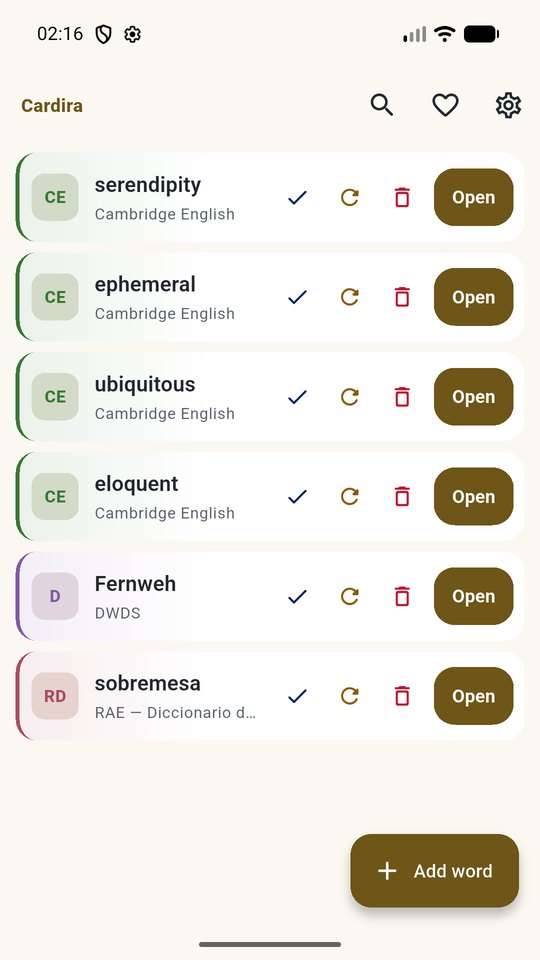
Dark and light. Gold on charcoal by default, warm ivory in daylight. Both are built to WCAG AA contrast, every colour cue has a text or shape cue beside it, and the per-dictionary row tint can be turned down or off.
How Cardira is paid for, honestly

Everyone gets the same app. There is no paid tier to compare yourself against, because there is no paid tier.

Cardira is free and stays free, and nothing in it is locked. It shows ads: clearly labelled ad cards between your words, and a short video you can choose to watch to support the work. You can also leave a one-off tip if you would like to.

A tip unlocks nothing — no ad removal, no extra features, no learning advantage — just a thank-you and a badge kept on your own phone.

In the UK, the EEA and Switzerland you are asked about ad personalisation before any ad loads, and you can change that answer at any time in Settings.

  • No paywall, no trial, no subscription. Every feature is in the free app on day one.
  • Ads are labelled and never dressed up as content. They sit in their own cards, never as a menu, a control or a download button.
  • The rewarded video is opt-in. It only plays after you tap to watch it, and the dictionary opens either way.
  • We collect nothing ourselves. What is collected is collected by Google and its advertising partners, and by the store when you tip — all of it set out in the Privacy Policy.

Who makes it

Cardira is built in the UK by Gearoenix Ltd, a small independent developer.